Does Apple Watch Call 911 If Your Heart Stops?
No. Apple Watch does not automatically call 911 if your heart stops or if it detects no pulse. It has Emergency SOS and Fall Detection, but both work under specific conditions and generally require user action or a detected hard fall. Apple Watch will not text your family on its own either.
Does Apple Watch call 911 if your heart stops?
No. There's no Apple Watch feature that detects a "stopped heart" or missing pulse and places an emergency call by itself. Apple Watch can notify you of an irregular heart rhythm, but that notification stays on your wrist — it doesn't trigger a 911 call. The only features that can call emergency services automatically are Fall Detection and Crash Detection, and only after a specific event is detected and you don't respond.
Will Apple Watch call 911 if you stop breathing?
No. Apple Watch doesn't treat breathing as an emergency trigger and has no feature that calls 911 for a breathing-related event. Some models track blood oxygen periodically, but that reading is informational — it never generates an emergency call on its own.
Can Apple Watch detect a heart attack?
No. Apple Watch does not detect heart attacks. Its ECG app can check a single reading for atrial fibrillation, and irregular rhythm notifications flag unusual patterns over time — but neither identifies a heart attack, and neither calls 911. RscMe does not diagnose heart attacks either. It sends an SMS alert when your heart rate crosses a limit you set — nothing more.
What is Emergency SOS and when does it call 911?
Emergency SOS is triggered manually — you press and hold the side button until the Emergency Call slider appears, then drag it, or keep holding through the countdown. Apple Watch then calls emergency services and can notify your emergency contacts with your location. Crash Detection and Fall Detection can trigger the same call automatically, but only after a severe crash or hard fall is detected and you don't respond to an on-screen prompt within about a minute.
How does Apple Watch fall detection work?
Apple Watch uses its accelerometer and gyroscope to recognize a hard fall. If one is detected, it taps your wrist, sounds an alert, and shows a screen to contact emergency services or dismiss it. If you don't respond within about a minute, Apple Watch automatically calls emergency services and messages your emergency contacts with your location. Fall Detection is based entirely on motion — it has nothing to do with heart rate. RscMe does not currently include fall detection; it works from heart rate alone.
Is Apple Watch a medical alert device?
Not in the traditional sense. A dedicated medical alert device — a wearable pendant with a live call center — connects you to an operator when you press a button. Apple Watch doesn't work that way. What it has is Emergency SOS (press and hold the side button to call emergency services and notify your contacts with your location) and Fall Detection, which may call emergency services automatically if you don't respond after a hard fall. Neither texts your family on its own. RscMe adds automatic SMS to up to 5 contacts you choose, triggered by your heart rate crossing a limit you set — no button press needed.
How do Apple Watch heart rate alerts work?
Apple Watch has built-in high and low heart rate notifications with thresholds you can adjust within Apple's supported range, and they notify only you, on your wrist or paired iPhone. RscMe uses the same underlying heart rate data but lets you set custom tachycardia (high) and bradycardia (low) thresholds tailored to your own baseline — and instead of a silent notification, it sends an SMS to the contacts you choose.
Can Apple Watch alert my family instead of 911?
Not on its own. Apple Watch's built-in alerts are private — they go only to you. Apple Watch won't text your family. RscMe does. When your heart rate crosses your limit, RscMe sends an SMS to up to 5 trusted contacts you choose — not to 911 — with your name, current heart rate, and a GPS link. Setting this up for a parent? See how to get alerted when your parent's heart rate is abnormal.
Apple Watch alone
- Heart-rate alerts go only to you
- Emergency SOS typically requires user action
- Fall Detection can call emergency services after a hard fall
- Uses Apple's fixed thresholds
With RscMe
- SMS to your selected contacts (up to 5)
- Message includes name, heart rate, and GPS location
- Contacts receive normal SMS, no app needed
- Custom high/low limits (tachycardia/bradycardia)
How does RscMe send SMS alerts to your contacts?
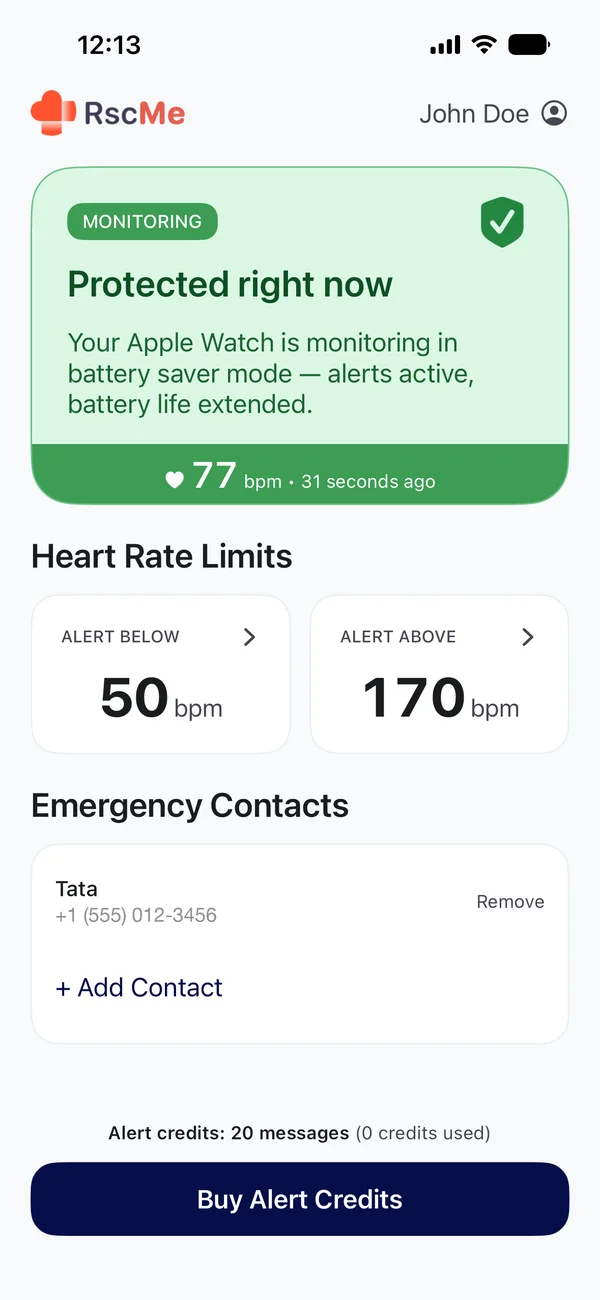
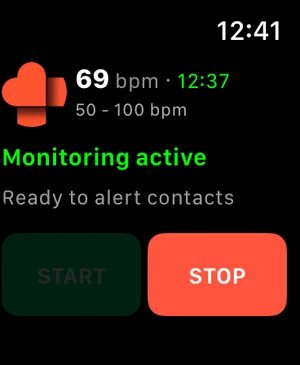
RscMe monitors your heart rate directly on Apple Watch. When it crosses a limit you've set, it triggers your nearby iPhone to send a real SMS — not an app notification — to each contact you've chosen, with your name, current heart rate, and a GPS link to your location. Contacts don't need the app or an iPhone to receive it.
Monitoring modes and Battery Saver
- Normal monitoring: approximately every 5 seconds.
- Battery Saver mode: when Apple Watch Low Power Mode is enabled in Settings → Workout → Low Power Mode, checks are approximately once per minute.
- Both modes can trigger alerts when thresholds are crossed.
Alert delivery is not guaranteed in all situations — it depends on your device, permissions, battery, connectivity, and available credits.
Apple Watch and iPhone requirements
Apple Watch is required for monitoring. In normal use, your iPhone handles SMS sending and should be nearby.
Alert Credits pricing
SMS alerts require Alert Credits: $3.99 for 20 credits, or $6.99 for 50 credits. Credits never expire. Each alert uses 1 credit per contact, and alerts are sent only if credits are available.
Safety disclaimer
RscMe is not a medical device. It does not diagnose heart attacks. It does not call 911. It does not monitor 24/7 with guaranteed delivery. Alert delivery depends on device state, permissions, battery, connectivity, credits, and SMS availability.
Ready to set it up?
Download RscMe on the App Store
Set heart-rate limits, choose your trusted contacts, and activate SMS alerts in minutes.