How Often Does Apple Watch Check Your Heart Rate?
It depends on your watch model, what you're doing and whether Low Power Mode is on. The newest models measure as often as every five seconds. Older ones measure in the background, and Apple doesn't publish a fixed interval for them.
Here's what Apple says, what turns heart rate measurements off, and why readings sometimes go missing.
How often does Apple Watch measure heart rate in the background?
- Apple Watch Series 12 and Ultra 4: according to Apple, they use the green LEDs continuously during the day and give a measurement as often as every five seconds, even when you're moving. During your sleep schedule they switch to infrared light.
- Older models: Apple doesn't give an interval. The watch measures in the background while you wear it, and how many readings you see varies with your activity.
- Your own check: open the Heart Rate app for a reading right away. With the Digital Crown on Series 4 and later (and all Ultra models), holding your finger on the crown gives a measurement every second instead of every five.
On Series 12 and Ultra 4 you can turn continuous measurements off in Settings → Heart on the watch. Leave it on if you rely on heart rate alerts.
Does Apple Watch measure heart rate continuously during a workout?
Yes. By default, Apple Watch monitors your heart rate for the Heart Rate app, workouts, and Breathe and Reflect sessions, and keeps measuring as long as you wear it. That's why a workout gives you a much denser heart rate graph than an ordinary afternoon.
Does Low Power Mode stop heart rate monitoring?
Mostly, yes. According to Apple, Low Power Mode turns off:
- background heart rate measurements, including during sleep
- high heart rate, low heart rate and irregular rhythm notifications
The exception is workouts. Apple says that in the Workout app, heart rate and pace are still measured in Low Power Mode.
If someone relies on heart rate notifications, Low Power Mode quietly switches them off.
Why does my Apple Watch miss heart rate readings?
Apple lists several reasons:
- Wrist Detection is off. Background readings, like resting and walking heart rate, aren't taken without it.
- Heart Rate is turned off in Privacy settings. Then there's no measurement at all.
- The fit is loose. The sensor needs skin contact. Wear the watch snugly, above the wrist bone. Apple's test: shake your wrist and turn your palm up. If the back of the watch lifts off your skin, tighten the band.
- Cold. Blood flow in the skin can drop too low for a reading, for example when exercising in the cold.
- Tattoos. Some ink can block the sensor's light.
- Irregular movement. Tennis or boxing gives worse readings than running or cycling.
Apple also notes that even under ideal conditions the watch may not get a reliable reading every time, and that for a small number of people it can't get one at all.
When do high and low heart rate notifications go off?
You choose a limit in the Watch app on iPhone: My Watch → Heart → High Heart Rate / Low Heart Rate. If your heart rate stays above or below that limit, the watch notifies you. They're available on Series 1 and later, for ages 13 and up, and they're off in Low Power Mode.
The notification appears on the wrist of the person wearing the watch. If you want family to know too, see how to get alerted when a parent's heart rate is abnormal.
What changes when RscMe is monitoring?
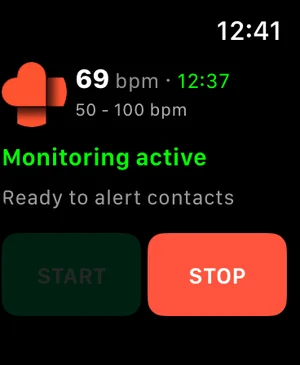
RscMe doesn't set its own measuring interval. When you tap Start on the watch, it runs monitoring as a workout session, the same mechanism the Workout app uses. So the watch measures heart rate the way it does during a workout, not the sparser background way.
- Low Power Mode: RscMe keeps monitoring and the watch shows “Battery saver active”. Apple's own heart rate notifications are off in Low Power Mode, as described above.
- Only fresh readings count. RscMe ignores any reading older than 60 seconds, so it never sends an alert based on a stale number.
- Only measured readings count. If the watch stops getting readings (loose, off the wrist, on the charger), RscMe sends nothing. It texts your contacts only when it measures a heart rate outside the limits you set.
When it does, your iPhone sends a standard SMS with your name, heart rate and a GPS link to up to 5 people. They don't need an app.
Frequently asked questions
How often does Apple Watch check your heart rate?
Apple Watch Series 12 and Ultra 4 measure as often as every five seconds during the day. For older models, Apple doesn't publish an interval: the watch measures in the background while you wear it, and the number of readings varies with activity. During workouts it measures continuously.
Does Apple Watch check heart rate while you sleep?
Yes, unless Low Power Mode is on. Apple says Low Power Mode turns off background heart rate measurements, including during sleep. Series 12 and Ultra 4 use infrared light during the sleep schedule.
Does Low Power Mode turn off heart rate notifications?
Yes. In Low Power Mode, Apple Watch doesn't send high heart rate, low heart rate or irregular rhythm notifications.
Why does my Apple Watch not record my heart rate?
The most common reasons are Wrist Detection turned off, a loose fit, Low Power Mode, or Heart Rate turned off in Privacy settings. Cold skin, some tattoos and irregular movement can also block readings.
Can an app make Apple Watch measure heart rate more often?
An app can run a workout session, and during a workout Apple Watch measures heart rate continuously. That's how RscMe monitors. Apple decides the actual sampling rate.
Sources
- Apple Support: Monitor your heart rate with Apple Watch
- Apple Watch User Guide: Check your heart rate
- Apple Support: Low Power Mode on Apple Watch
- Apple Support: Heart health notifications on your Apple Watch
- Apple Support: what affects heart rate readings
- Apple Support: how to wear Apple Watch for a good fit